· 20 min read
IFR Chart Legend for Every Chart You Fly
Use the IFR chart legend by product: enroute, SID, STAR, and approach symbols, altitude lines, and a full plate-reading sequence.
The most repeated advice about the IFR chart legend is to memorize the icon sheet until every mark looks familiar. That advice fails on the first real plate. A minimum altitude, a mandatory altitude, a crossing restriction, and an obstacle elevation can sit within an inch of each other, and the drawing will not tell you which number you are cleared to fly. The symbol is not the clearance. The panel is.
A good briefing doesn't start with more icons. You name the chart product, then the panel, then you apply only that legend. Low enroute is not an approach profile. A STAR restriction is not a taxi hot spot. Until the product and the panel are named, every number on the page is just ink.
Students who drill flashcards still miss the same three swaps on a checkride. They fly a MOCA as if it were an MEA. They read an obstacle elevation as the altitude to hold. They extend the final approach course past the missed approach point and call that the miss. More icons would not have stopped those errors. Switching context would have.
Name the product. Open only its legend. Trace one path. Match the printed number to the panel that owns it. Then change charts and start over.
Table of Contents
- IFR Chart Legend Families You Actually Open
- Where the Official Legend Lives
- Enroute Charts and Altitude Limits
- Approach Plate Symbols in All Six Sections
- Missed Approach Lighting and Airport Diagrams
- Symbols That Look Like Clearances But Are Not
- Reading One Plate in Order From Margin to Taxi
- Drill Weak Legend Items Before the Knowledge Test
IFR Chart Legend Families You Actually Open
Pick the legend before you pick a symbol. US IFR charting is several products, not one drawing, and each product has its own IFR chart legend family. The table is the lookup. Name the product in your hand, take that row, and leave every other legend closed until the phase of flight changes.
| Chart product | Legend family | What it explains | When you use it |
|---|---|---|---|
| IFR enroute low | Enroute symbology | NAVAIDs, Victor and T routes, MEA, MOCA, airports, comm boxes | Below 18,000 ft MSL |
| IFR enroute high | High-altitude enroute symbology | Jet and Q routes, high-altitude NAVAIDs, MAA | At and above 18,000 ft MSL |
| SID or ODP | Graphic departure legend | Departure path, climb gradient, restrictions | After takeoff |
| STAR | Arrival legend | Transitions, fixes, published altitude restrictions | Arrival |
| Approach plan view | Plan-view symbols | Course, fixes, primary NAVAID, obstacles | Lateral path |
| Approach profile | Profile symbols | Altitude lines, step-downs, DA or MDA, MAP | Vertical path |
| Landing minimums | Minima block | Category A through D visibility and ceiling values | Before starting the approach |
| Airport diagram | Airport diagram legend | Runways, taxiways, hot spots, hold-short lines | Taxi |
Low and high enroute are different books. Victor airways and T routes belong on the low chart. Jet routes and Q routes belong on the high chart. When the clearance altitude moves you from one book to the other, the legend moves with it. A victor altitude you memorized last month is not a brief for a jet route.
Terminal paper splits again. A SID or ODP, a STAR, an instrument approach, and an airport diagram do not share a key. Inside one approach chart, the briefing strip, plan view, profile view, landing minimums, and airport sketch still use different marks. An approach chart is not "the plate legend." It is five panels that have to agree.
Say the clearance is "climb via the SID, then as filed." The climb gradient and the departure path come from the graphic departure legend. The altitude you level at, once you are on the airway, comes from the enroute row. Pilots who leave the departure legend open will brief an airway altitude as if it were still a climb restriction.
On the way in, a published STAR altitude is a restriction on that transition. It is not the decision altitude on the profile you have not opened yet. The airport diagram does not start until you are on the ground, even when the runway number already sits in the approach title.
Name it first: Say the product and the panel out loud before you interpret a mark. If you can't name the row, you are not ready to brief the number.
A phone stack of plates, enroute charts, and taxi diagrams does not merge those families. Choosing among aviation apps pilots actually brief from is a toolkit decision, not a substitute for the row. Start every chart at the title and the margin. Match the row. Then read.
Where the Official Legend Lives
A training copy of a legend is a classroom aid. The chart you fly is the reference, and it is current only for the edition printed on it. Before any flight, read the effective date and the amendment identifier in the margin and match them to the publication you are using. A procedure that was amended last cycle can keep a familiar title and still change a note, a fix, or a minimum.
Authorized publishers print from the same national system, so the region of the chart is not a reason to invent a local meaning for a mark. It is a reason to confirm you have this cycle's sheet. A symbol that is routine on an enroute chart does not travel onto an approach plate. If you can't name the product, don't borrow yesterday's definition.
Make that check the first step of every legend lookup. In the flight log, write the chart product, the edition, and the amendment beside the route, altitude, fix, and frequency you copy. If the margin and the log disagree, you are briefing the wrong sheet. Stop and pull the current one before you copy another number.
If the amendment on the plate isn't the amendment in your log, nothing else on that page is briefed yet.
Enroute Charts and Altitude Limits
Read an enroute legend as a route authorization, not as a sketch of the approach you will fly later. The FAA aeronautical charting program is the authoritative source for the data on these charts, which are produced through authorized publishers, and IFR enroute low-altitude charts specifically support navigation below 18,000 feet mean sea level. The same conventions put distance in nautical miles, altitude in feet above mean sea level, and time in Coordinated Universal Time. The Aeronautical Chart Users' Guide organizes symbols by chart type as a teaching aid, and those drawings may not be to scale, so you use the published numbers rather than the drawn length.
What a low-altitude segment actually authorizes
Name the marks on a Victor segment before you argue about altitude. A VOR or VORTAC is shown with frequency, identifier, and Morse code. Reporting points are compulsory or not. Intersections are defined by radials. Victor airways and RNAV T routes are the low-altitude route types. A changeover point tells you where the governing navaid switches along the segment.
Then read the altitudes printed on that segment, not the picture of it.
| Depiction | Where it appears | Meaning | Do not |
|---|---|---|---|
| MEA | Enroute airway segment | Lowest published altitude for the segment, the altitude you plan to fly | Fly the airway below the MEA |
| MOCA | Enroute airway segment | Obstacle clearance; VOR reception assured within 22 NM | Assume navaid reception beyond 22 NM or descend to it for the whole segment |
| MCA flag | Enroute fix | Minimum altitude to cross the fix toward a higher MEA | Cross the fix below the flag |
| MRA | Enroute fix | Lowest altitude at which the defining signal is received | Assume the fix is usable below the MRA |
| MAA | High-altitude route | Maximum authorized altitude | Climb above it on that route |
Say you are filed on a Victor segment with an MEA of the higher printed value and a lower MOCA under it. The MEA is the altitude you plan to fly. The MOCA is obstacle clearance on that segment. VOR reception on it is assured only within 22 nautical miles of the VOR, so the MOCA is not permission to ride the whole airway at that lower number. An MCA flag is the minimum altitude to cross that fix toward the higher MEA. An MRA is the lowest altitude at which the signal that defines the fix can be received. Below it, you don't have the fix, even if the line still looks continuous.
Mileage is the printed break and the total, never the length of the ink. The communications box is a separate lookup for frequency, facility name, and a remote outlet. It is not a navaid, and you don't tune it for course guidance.
What the high chart changes
At and above 18,000 feet MSL you are on the high-altitude chart. Jet routes and Q routes replace Victor and T routes, and the navaids are the high-altitude facilities. An MAA on that route is a ceiling. It is the top you may not climb through on that route, not a target to round up to. Copy only published numbers into the log: route, altitude, fix, and frequency.
Approach Plate Symbols in All Six Sections
Treat every instrument approach plate as six coordinated sections. Don't let a symbol from one panel answer a question that belongs to another.
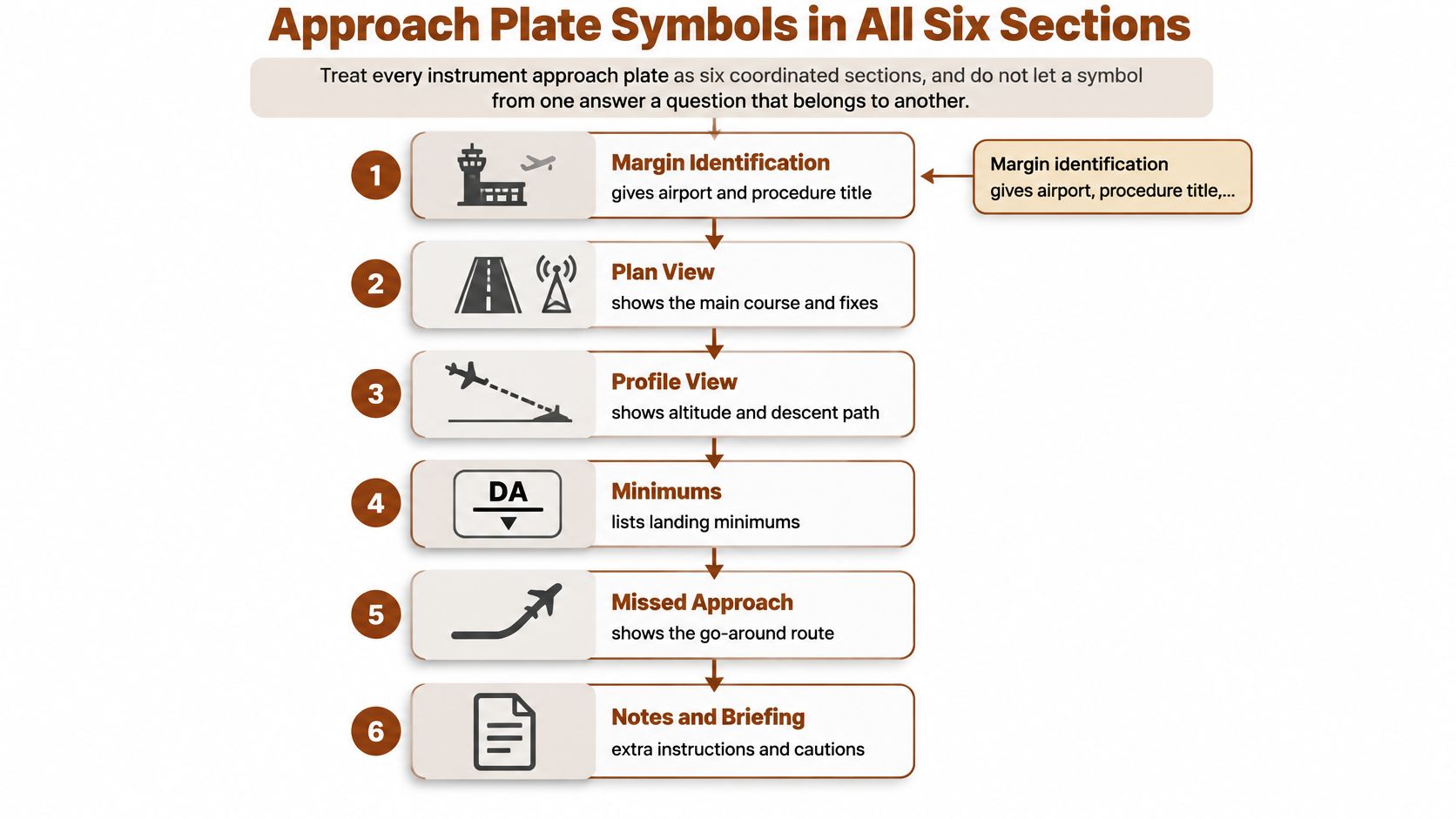
The FAA Chart Users' Guide ties legend reading to those six sections: margin identification, pilot briefing and notes, plan view, profile view, landing minimums, and the airport diagram. In the plan view, a navaid carries name, frequency, identifier, and Morse code, and a heavy-line box marks the primary facility. RNAV charts identify a GPS waypoint by symbol, name, and identifier. A dot with an MSL altitude is a known spot elevation. An inverted V with a central dot is an obstacle, and the highest one is drawn larger or bolder. Thick solid lines, intersections, fixes, and radials show sequencing, so you cross-check notes, profile, and minimums instead of reading any mark alone.
What each panel is allowed to tell you
Margin identification gives the airport, the procedure title, the amendment, and the equipment the title itself requires, such as ILS, LOC, or RNAV (GPS). If the title says RNAV (GPS), a VOR frequency on the plan view is not your primary source.
Pilot briefing and notes hold the traps that are not pictures: equipment notes, nonstandard takeoff or alternate notes, and procedural restrictions. This panel can cancel a comfortable reading of the drawing.
Plan view is the lateral path. Profile view turns that path into altitudes, step-down fixes, the glidepath or descent angle, and the missed approach point. Landing minimums are a table by aircraft category, not a height you estimate from the sketch. The airport sketch shows runway layout, lighting references, and the circling footprint. That footprint is not the missed approach path.
| Symbol | Where it appears | Meaning | Do not |
|---|---|---|---|
| Heavy-line box | Plan view | Primary NAVAID for the approach | Use another frequency as the primary navaid |
| Inverted V with central dot | Plan view | Obstacle; highest one drawn larger or bolder | Read its elevation as the altitude to fly |
| Dot with MSL altitude | Plan view | Known spot elevation | Treat it as an approach fix |
| Thick solid line | Plan view | Final approach course and sequencing | Extend it past the MAP as the missed approach |
| Underline under altitude | Profile view | Minimum altitude, cross at or above | Descend below it |
| Overline over altitude | Profile view | Maximum altitude, cross at or below | Climb above it |
| Lines above and below | Profile view | Mandatory altitude, cross at the printed value | Treat it as a window |
| No altitude lines | Profile view | Recommended altitude only | Cite it as a required minimum |
| Hatched track | Plan or profile | Missed approach track after the MAP | Fly it before the MAP |
Profile lines and the four-item check
Profile line style is the clearance. An underline means a minimum, so you cross at or above it. An overline means a maximum, so you cross at or below it. Lines both above and below mean a mandatory altitude, so you cross at the printed value. No lines means recommended only. It is not a required minimum.
Build one composite check. Primary navaid or GPS waypoint from the plan. Altitude from the profile. Visibility from the minimums. Runway from the sketch. If any of those four disagree with a note, the note wins.
A short walkthrough of how those panels sit on a real plate makes the handoff easier to see than a symbol list does.
Missed Approach Lighting and Airport Diagrams
After the missed approach point you change legends again. The missed approach is its own procedure. It is often a dashed or hatched track, with text in the profile that states the climb, the heading or course, and the clearance limit or the hold. Do not extend the final approach course past the MAP and rename that line the miss.
Three depictions people merge
Where the MAP sits depends on the procedure type. A decision altitude on a glidepath is not the same picture as a missed approach point defined by a fix, a navaid, or a timed distance from the final approach fix. Precision and nonprecision plates can place that point differently. Read the text and the track together. If the text says climb to an altitude on a heading, that sentence is the procedure, and the pretty line is only the picture of it.
Approach lighting is a separate legend family. On a knowledge test you should recognize ALSF-1, ALSF-2, MALSR, MALSF, and ODALS from the symbol and the runway sketch. Each one tells you what to expect in the visual segment. None of them is a visibility credit. Credit, if any, is in the minimums notes, and you don't grant it to yourself from the lighting icon.
The airport diagram takes over on the ground. Runway numbers, threshold elevations, taxiway identifiers, hold-short bars, and hot-spot circles are diagram symbols. A hot spot is a known collision-risk area. It is not an approach fix, and it is not a reporting point you call on the missed approach.
The arrival handoff
Brief the handoff in one breath. At minima, name the lighting system you expect to see. If you miss, fly the published miss text from the MAP, not a continuation of the final course. After landing, switch to the airport diagram before you accept the first taxi clearance. That handoff is the cross-reference most one-page legend sheets leave off, and it is where a correct approach brief turns into a wrong taxi brief.
The miss starts at the MAP, in the words printed for the miss. The diagram starts when the wheels are on the pavement.
Symbols That Look Like Clearances But Are Not
Several printed items look like clearances because they sit next to a number. They are information for a different job.
- A MOCA is obstacle clearance on a segment. It is not permission to descend for the whole airway, and it does not promise navaid reception for every mile of that segment.
- The elevation beside an inverted V is a hazard reference. The altitude you fly comes from the profile and the minimums, never from that hazard number.
- A spot elevation, the dot with an MSL value, is terrain or obstacle information. It is not an approach fix you may fly to.
- A communications box lists frequencies and facility names. Its remote outlet is not a navaid. Phraseology for those calls belongs with radio procedure practice, not with approach guidance.
- Airport information is not approach minimums. Visibility and ceiling come only from the minima block.
- The circling footprint on the airport sketch is not the missed approach path.
- A hot spot is a ground collision-risk area, not a fix on the approach.
- The drawing is not to scale. A short-looking segment is never a distance.
Treating the obstacle elevation as the altitude to fly, or the circling footprint as the miss, gives you the wrong instruction for that phase. Check the number against its own panel before you brief it.
Reading One Plate in Order From Margin to Taxi
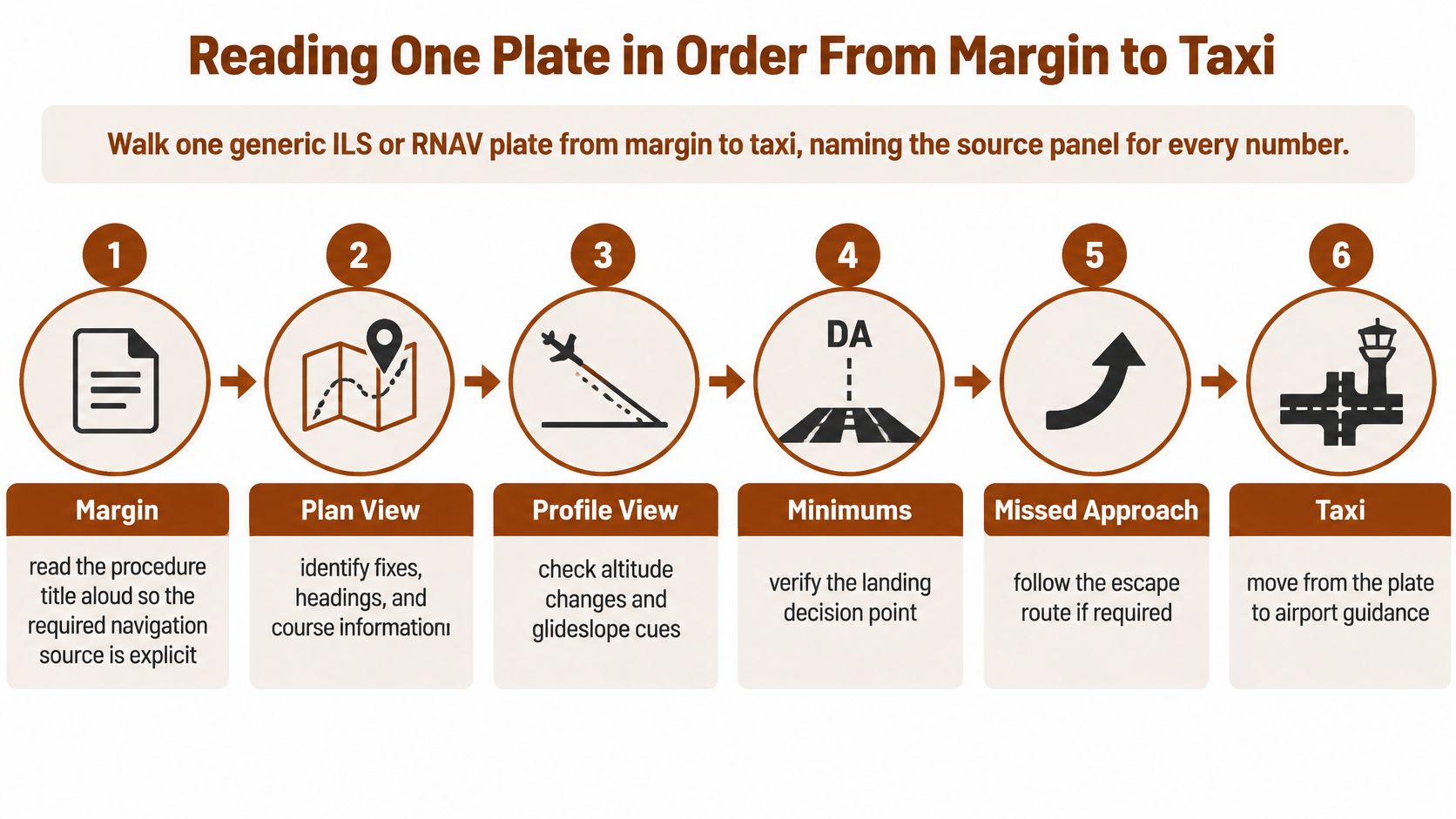
Walk one generic ILS or RNAV plate from the margin to taxi, and name the source panel for every number you speak. FAA terminal procedure standards require separate legend groupings for approach plan-view symbols, profile symbols, arrivals, graphic departures, airport diagrams, and approach lighting systems. The practical question is which legend applies to the chart section you are reading, and how you combine symbols without confusing a minimum altitude, a mandatory altitude, a crossing altitude, or an obstacle depiction. The same standards family shows hatched missed-approach tracks and different missed-approach points for precision and nonprecision procedures. Memorizing more symbols doesn't fix the swap. Context switching does.
Margin through the minima block
Say you are briefing the ILS or the RNAV (GPS) into a towered field you already know by eye. Familiarity is the trap.
- Margin. Read the procedure title aloud so the required navigation source is explicit. Check the chart type and the amendment. An ILS title is not satisfied by the GPS waypoint, and an RNAV (GPS) title is not satisfied by the localizer frequency printed nearby.
- Name the product and the panel before you interpret a mark. "Plan view" or "profile" has to come out of your mouth first.
- Briefing strip. Scan the notes, the missed approach text, and the frequencies you will dial. A note that restricts a transition beats a clean-looking line.
- Plan view. Identify the initial approach fix, the intermediate fix, the final approach fix, and the final approach course. Mark the heavy-line navaid box or the GPS waypoint identifier as primary. Refuse any other frequency as primary.
- Obstacles stay in their column. Note the highest obstacle symbol and its MSL elevation. That number never moves into the altitude-to-fly column.
- Profile. List each fix with its line style. An underline is at or above, an overline is at or below, and lines on both sides are mandatory. Take DA or MDA only from the profile and the minima block.
- Minima. Copy the visibility for your aircraft category. Don't borrow Category A because the number is smaller.
After the MAP, then the surface
- State the MAP, then the first missed approach instruction and any hatched track. You don't fly that track early.
- On the airport sketch, confirm the landing runway and the lighting system you expect at minima. Taxi guidance waits until you are down.
The cross-reference is short enough to say on downwind or in the sim: plan view for where, profile for how high, notes for exceptions, minimums for landing, and the missed approach only after the MAP. If any two sources disagree, stop and reread the note before you brief the approach. A complete-chart pass like this, rather than an icon flashcard, is what keeps a crossing restriction from being flown as a target.
Drill Weak Legend Items Before the Knowledge Test
You are ready for the instrument knowledge test when legend items stop being the questions you miss. Build the drill from the swaps that fail people, and say the panel name before each answer.
- Name the chart product before you name the symbol. If the first words aren't "low enroute" or "profile," the answer doesn't count.
- Translate profile line styles into at or above, at or below, or mandatory. Cover the altitude and force the line style to do the work.
- Separate MEA, MOCA, and MCA on one segment. Point at which number you plan to fly, which one is only obstacle clearance, and which flag you must cross.
- Point to the primary navaid box without guessing. On an RNAV plate, point to the waypoint identifier instead of a leftover VHF frequency.
- Brief the miss from the MAP and the printed text. Extending the final course is a wrong answer even when the geometry looks smooth.
Use plates you already fly, or the sample plates in the Chart Users' Guide. Log every miss by category, then rerun those items with spaced repetition. A single good quiz doesn't clear a category you missed yesterday.
A structured pass through weak knowledge areas is laid out in our IFR study guide. We treat you as ready to schedule the test when you are scoring 85% or higher consistently. We give a detailed, plain-English explanation for every single question, and active DPEs and CFIs update those questions monthly. Set that 85% bar before you start the full-length set. Book the exam only when your scores hold above it across several attempts, not after one clean quiz. If a legend category is still in the miss log, that category is the next session, not a new stack of icons.
flyCowboys is built for the FAA instrument knowledge test, with ACS-mapped practice that forces you to name the chart panel before you pick the altitude. If legend swaps are still showing up in your miss log, work them in plain-English question explanations until the 85% bar holds. Start that drill with flyCowboys.