· 23 min read
Flight Plan Format ICAO: A Field by Field Guide
Use this flight plan format icao guide to fill every numbered field, copy a sample plan, avoid Item 18 rejections, and file electronically.

You've entered the departure airport, picked a route, and opened the filing screen. Then the app asks for equipment letters, a wake category, and “other information.” Your aircraft profile already contains a string of codes, but you're not sure whether they describe the airplane you're flying today.
Treat the ICAO flight plan format as a structured message, not a form you should fill with every abbreviation you recognize. Each entry needs a purpose, the equipment declarations need to agree, and the receiving computer needs to recognize the characters. A shorter, accurate message is better than a detailed one that overstates your capabilities or gets rejected.
Table of Contents
- ICAO Flight Plan Items at a Glance
- A Worked Sample ICAO Flight Plan
- Aircraft Identity Flight Rules and Wake Category
- Equipment Codes in Items 10 and 18
- Route Destination Alternates and Endurance
- Character Rules and Rejection Errors
- File Electronically Through an Accepted Service
- FF-ICE Transition and Which Message to Send
- Practice the Knowledge Test Topics
ICAO Flight Plan Items at a Glance
| Item | What to enter | Format limit | Example |
|---|---|---|---|
| 7 Aircraft identification | Registration or operator designator plus flight number | Up to seven alphanumeric characters, without hyphens or symbols | N12345 |
| 8 Flight rules and type | Rules letter followed by type of flight | I, V, Y, or Z, then S, N, G, M, or X |
VG |
| 9 Type and wake | Aircraft count when applicable, ICAO type, wake category | Omit count for a single aircraft; wake category J, H, M, or L |
C172/L |
| 10 Equipment | Communication, navigation, and approach aids before the slash; surveillance after it | Authorized codes for available capabilities; N when none applies in the relevant group |
S/C |
| 13 Departure | Aerodrome indicator and estimated off-block time | Aerodrome location indicator or ZZZZ, followed by UTC time |
KAPA1430 |
| 15 Speed, level, and route | Cruising speed, requested level, then route | Prescribed speed and level groups followed by route syntax | N0100A055 DCT |
| 16 Destination and EET | Destination, total estimated elapsed time, alternate aerodromes | Elapsed time in hours and minutes; designated alternate positions | KDEN0130 KBJC |
| 18 Other information | Authorized indicators and their associated data | No internal field-separating hyphen; use 0 after the separator when empty |
PBN/C2 |
| 19 Supplementary | Endurance, persons, emergency and survival information | Use the form's labeled entries; retain or transmit as the ATS unit requires | E/0330 P/02 |
The revised format became effective worldwide on 15 November 2012, after FAA systems began accepting it on 15 September 2012, according to the FAA implementation notice.
Read the table as a message map
The item numbers identify defined pieces of operational information. They aren't a sequence of questions that invites free-form answers. Aircraft identification belongs in its designated field, route information belongs in the route, and capability details belong under the appropriate indicators.
The examples are individual formatting illustrations, not a combined plan you should submit. In particular, an equipment example doesn't certify that your airplane has those capabilities, and an altitude example doesn't establish terrain clearance.
Notice the distinction between an aerodrome indicator and a familiar airport name. Your filing service may let you search by name, then insert the appropriate indicator. That convenience doesn't change what the transmitted message needs to contain.
Separate the form from the transmitted message
An app may present friendly labels such as “departure time,” “transponder,” or “fuel endurance.” It then converts your selections into a message. You still need to understand the result well enough to catch an incorrect aircraft profile or a misplaced entry.
Supplementary information also deserves attention even when it doesn't appear in the same transmitted message as the route. Complete the emergency information requested by the filing workflow, rather than assuming a successful route submission means every search-and-rescue detail is available.
Practical rule: Start with the information needed to identify the flight and describe its actual operation. Add codes because the flight requires them, not because the app offers a checkbox.
Most difficult filing problems arise where fields interact: equipment with navigation approvals, flight rules with route changes, or other information with message delimiters.
A Worked Sample ICAO Flight Plan
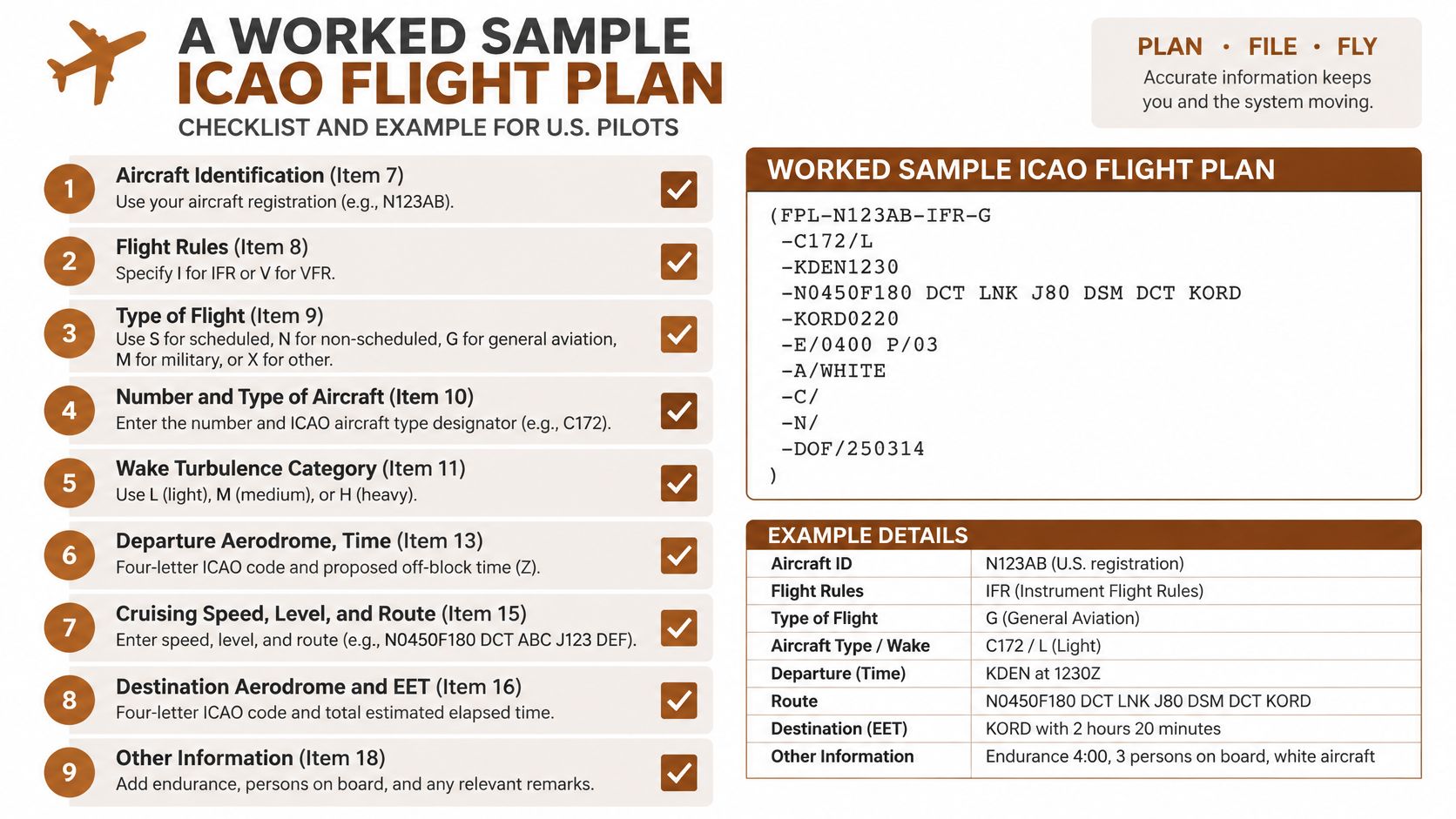
FPL-N12345-VG-C172/L-S/C-KAPA1430-N0100A055 DCT-KDEN0130 KBJC-DOF/260315
This is a token-reading exercise, not an operationally usable flight plan. The illustrated altitude is below Centennial's airport elevation, and the direct routing and elapsed time haven't been validated for this airport pair. A complete ATS message may also have an envelope and addressing supplied by the filing service.
Use the checklist graphic to connect the compact message with the form's labeled boxes.
Read each token aloud
N12345identifies the aircraft by its registration.VGdescribes VFR general aviation.C172/Lidentifies the aircraft type and light wake category.S/Cillustrates standard communication/navigation equipment with a Mode C transponder.KAPA1430illustrates Centennial as departure aerodrome with a proposed off-block time of 1430 UTC.N0100A055 DCTillustrates a speed of 100 knots, an altitude of 5,500 feet, and direct routing.KDEN0130 KBJCillustrates Denver as destination, an estimated elapsed time of one hour thirty minutes, and Rocky Mountain Metropolitan as alternate.DOF/260315illustrates a date of flight of 15 March 2026, not a current filing date.
Those numerical values are hypothetical teaching inputs. Don't use the displayed date, speed, altitude, or duration for an actual flight.
Change the operation, not just the rules letter
For an IFR version, VG becomes IG, but that substitution doesn't finish the planning. Choose a valid IFR route and altitude for the aircraft, terrain, airspace, and conditions.
An equipment token such as SG/S would describe a different installed capability set from the VFR example. It's appropriate only if those equipment and surveillance declarations are true. If the flight uses approved PBN capability, the equipment declaration also needs the applicable PBN indication and matching Item 18 descriptors.
Don't paste PBN/B2 into the message because you're flying IFR. Establish the aircraft's approved capabilities first.
The video provides another way to follow the filing workflow while keeping those distinctions in mind.
Check before copying
- Identity: The call sign fits the permitted length;
N12345contains six characters. - Separators: A hyphen separates adjacent message fields.
- Times: Clock times and durations use their prescribed compact formats.
- Other information: Item 18 contains no internal hyphen.
- Empty information: If nothing belongs in Item 18, the message ends that field as
-0, not a blank.
Aircraft Identity Flight Rules and Wake Category
The opening fields answer different questions: Who is flying? Under which rules? What kind of aircraft should ATC expect? Don't let a familiar registration or airplane nickname substitute for the correct answer.
Identify the flight, then classify the operation
For ordinary private flying or flight training, aircraft identification normally comes from the registration. An operator with an assigned designator may use that designator and its flight identification instead. Don't invent an airline-style identifier from a spoken nickname or an informal radio call.
Keep the aircraft count out of the identification field. Your home airport, aircraft model, and instructor's initials don't belong there either.
Item 8 combines flight rules with the kind of operation:
| Rules entry | Meaning |
|---|---|
| I | IFR |
| V | VFR |
| Y | IFR initially, followed by a change of flight rules |
| Z | VFR initially, followed by a change of flight rules |
The operation letter answers a separate question. G represents general aviation, the usual classification for private flying and training. S represents scheduled air transport, N non-scheduled air transport, M military, and X another category.
A training flight doesn't become a different type of operation just because an instructor is aboard. Choose the classification that describes the actual operation, not the pilot's certificate level.
Make a planned rules change explicit
Say you plan to depart a suitable airport VFR and obtain an IFR clearance farther along the cross-country route. That's a Z scenario when filed as a planned mixed-rules flight under the applicable procedures. The route must identify where the change will occur.
Conversely, Y describes a flight beginning IFR with a planned subsequent rules change. It isn't a promise that weather will permit cancellation, and the filing doesn't authorize a transition that would otherwise be unsafe or unlawful.
A flight-rules letter describes the plan. It doesn't replace an IFR clearance or permission to enter controlled airspace.
Use the aircraft designator, not the sales name
For Item 9, use an ICAO aircraft type designator such as C172 or C182. A marketing description such as Skyhawk doesn't serve the same purpose. For a single-aircraft flight, omit the aircraft-count prefix.
The wake category is a separate classification. Use the aircraft's documented category and the applicable state guidance rather than estimating from its appearance, seating capacity, or the word “light” in a sales brochure.
A typical trainer entry is C172/L, paired with VG for an ordinary VFR general-aviation operation. A light business jet may instead require M, despite being called a “light jet.” The wake letter affects separation expectations, so it isn't a cosmetic box.
Equipment Codes in Items 10 and 18
Build the equipment declaration from the airplane, not from a sample flight plan. Start with the current equipment list, approved operating documentation, and serviceability status. Then determine which capabilities are available and approved for the planned flight.
The FAA flight-plan filing FAQ distinguishes the compact equipment declarations from the additional capability information carried under indicators such as PBN/, NAV/, COM/, DAT/, and SUR/.
Establish the equipment before selecting approvals
In the communication/navigation portion, S represents the standard combination of VHF radio, VOR, and ILS. Don't select it if that combination isn't available. G identifies GNSS capability, while N is used when the applicable communication/navigation/approach capability is absent.
Surveillance follows the slash. Select the code or combination that describes the actual transponder and ADS-B installation. A Mode C illustration doesn't describe every modern trainer, and a portable traffic receiver doesn't establish an installed ADS-B capability.
Use the equipment map as a prompt to verify each selection against the aircraft documentation.
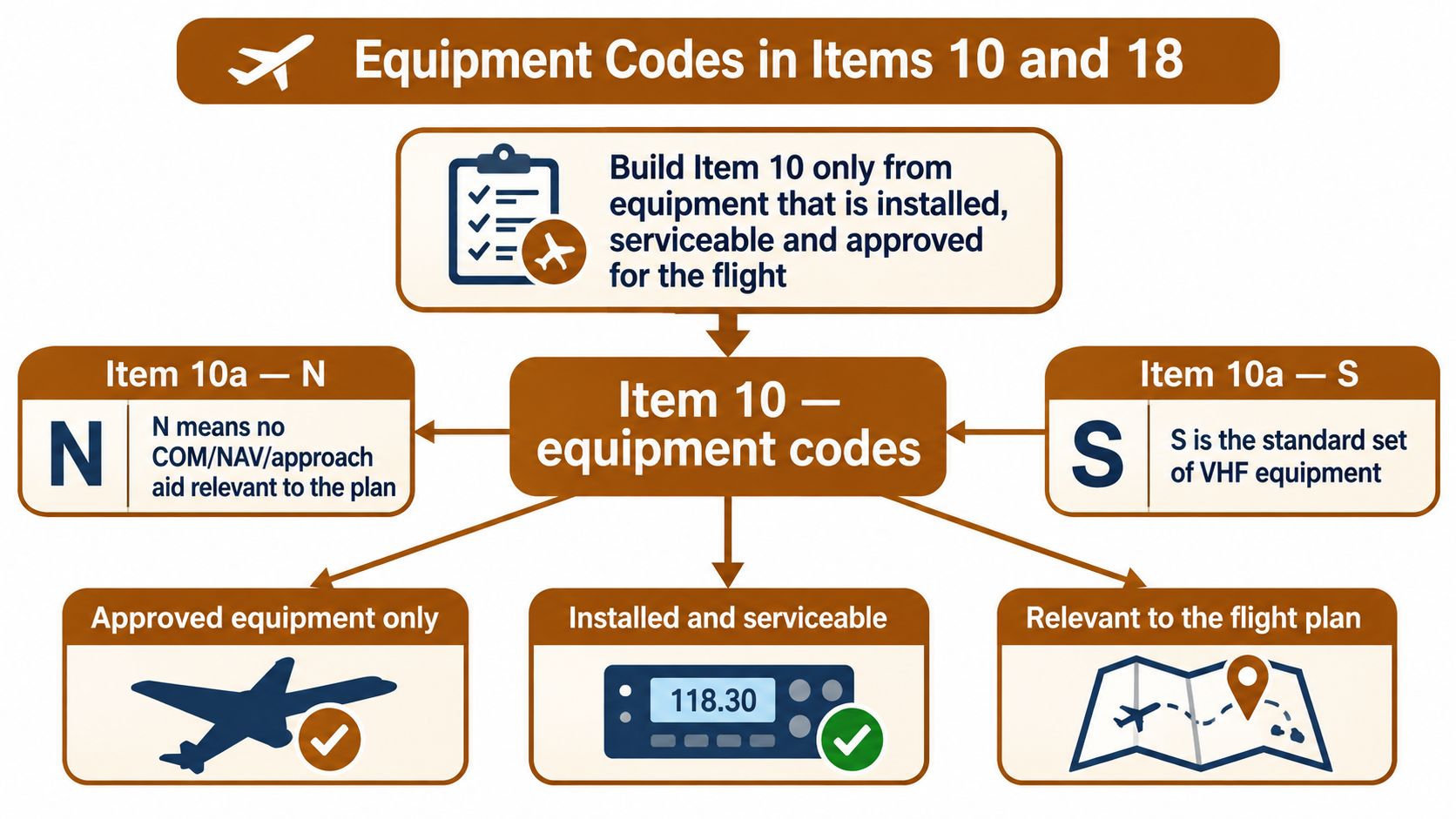
A saved profile can be wrong after maintenance, an avionics change, or an equipment failure. Before filing, distinguish installed, serviceable, and approved. A receiver's presence in the panel doesn't establish every navigation authorization its product family might support.
Match PBN claims to supporting equipment
The FAA equipment and operational-authorization reference table requires supporting equipment coding when PBN/ is filed and permits up to eight PBN descriptors, with a maximum 16-character PBN descriptor entry.
| Item 18 entry | Meaning | Required in Item 10a | Filing limit |
|---|---|---|---|
PBN/C2 |
RNAV 2 using GNSS | GNSS capability, such as G, with applicable PBN coding |
Counts as one of up to eight descriptors |
PBN/A1 |
RNAV 10 or RNP 10 | Applicable GNSS, inertial navigation, or both, with applicable PBN coding | Counts toward the same descriptor allowance |
PBN/ group |
Approved PBN descriptors | Supporting equipment letters whenever PBN is declared | Descriptor string limited to 16 characters |
R declares PBN approval in the equipment field; it doesn't replace the sensor codes or the approved descriptors. Likewise, adding G doesn't prove that every GNSS-based operation is authorized.
Writing “RNP capable” in remarks is not a substitute for the required structured declarations. The receiving system needs recognized codes, and the operator needs documentation supporting what those codes claim.
Add detail only when it serves the flight
Use NAV/ for applicable navigation detail, COM/ for communication detail, DAT/ for data-link detail, and SUR/ for surveillance detail. These aren't invitations to describe every avionics feature.
For a domestic flight, unnecessary indicators add opportunities for entry mistakes without improving the plan. For an international flight, check the applicable state AIP rather than assuming domestic conventions carry across the border.
An omitted capability can affect route eligibility. An overstated capability can create an expectation you can't meet. The correct entry is neither the longest nor the shortest possible string, but the one your aircraft and operation can support.
Route Destination Alternates and Endurance
The route field is an operational instruction written in a defined syntax. It starts with cruising speed and requested level, then describes the path. Treat it as something a computer must interpret before a controller can use it.
Build a route that can actually be flown
Enter named fixes, airways, and applicable procedure identifiers in the format accepted for the route. DCT means direct between the relevant points; it doesn't waive terrain, airspace, navigation, or clearance requirements.
Don't type a narrative such as “follow the highway, then turn toward the airport.” Likewise, keep telephone numbers, equipment explanations, and PBN declarations out of the route. Each has a different purpose and, where applicable, a different location in the message.
When a route involves a planned flight-rules change, include the change point and required rules notation. The rules selection alone doesn't tell the receiving unit where the transition is intended.
For published IFR routes, verify the chart symbols, fix names, and route structure before entering them. Our IFR chart legend guide can help with reading the chart, but the current chart and published procedures govern the flight.
Keep destination time separate from departure time
The destination entry combines the destination indicator with total estimated elapsed time. That duration is not the destination's local arrival time, nor is it a repeat of the UTC departure clock time.
Calculate it using the definition applicable to the flight rules and filing guidance. In particular, don't assume every IFR elapsed-time calculation ends overhead the destination airport when an instrument approach is planned.
Follow the destination information with the alternate indicators required by the plan. Naming an alternate in the form doesn't establish that its weather, approaches, runway, or fuel implications are acceptable.
| Location problem | Filing approach |
|---|---|
| Departure lacks a location indicator | Use ZZZZ and provide the required DEP/ details |
| Destination lacks a location indicator | Use ZZZZ and provide the required DEST/ details |
| Alternate lacks a location indicator | Use the applicable placeholder and ALTN/ details |
Complete the information used in an emergency
Supplementary information includes E/ for endurance and P/ for persons aboard, together with emergency and survival-equipment entries where applicable. Endurance describes how long the usable fuel can sustain flight under the planning assumptions, not the fuel quantity alone.
Some transmitted flight-plan messages don't display the supplementary block. Complete and retain it through the required workflow anyway, so the information is available when needed.
Before departure: Check that the route fits the declared equipment, the alternate is usable, and the fuel plan covers the required flight segments and reserves. Merely exceeding the destination elapsed time is not an adequate fuel check.
Character Rules and Rejection Errors
A flight plan can describe a sensible flight and still fail automated processing. The computer reads characters and fields exactly. A colon may not be accepted where four time digits are expected, and an unsupported equipment declaration can make the message inconsistent.
The FAA flight-plan filing guidance specifies no more than seven alphanumeric characters for aircraft identification, four figures in UTC for clock times, and four figures representing hours and minutes for elapsed times.
Check characters before adding detail
A UTC clock entry such as 1430 and an elapsed-time entry such as 0130 look similar but serve different purposes. The first is a clock time; the second is a duration. Enter both without colons.
The date-of-flight indicator uses compact year-month-day syntax. Let the filing service format the date when possible, then check that it represents the intended departure date, especially near UTC midnight.
Speed entries use N for knots, K for kilometres per hour, and M for Mach number. Their digit patterns are not interchangeable, so use the service's speed and unit controls rather than constructing an unfamiliar string by hand.
For levels, A indicates an altitude group, F a flight-level group, and VFR the permitted VFR entry. The prefix changes the meaning of the digits that follow.
Diagnose the rejection rather than guessing
The FAA domestic ICAO flight-plan reference guide explains that a hyphen inside Item 18 can be read as the start of supplementary information and cause rejection. It also notes that many domestic indicators are accepted but not required.
| What you filed | Why it fails | Correction |
|---|---|---|
| Hyphen inside Item 18 | May be parsed as the start of Item 19 | Remove internal hyphens from remarks and indicator data |
| Duplicate Item 18 indicator | Repetition is generally prohibited | Consolidate it unless a permitted exception applies |
PBN/ without supporting equipment |
The capability declaration does not match the equipment codes | Verify the installation and approvals, then correct or remove the unsupported claim |
| Inoperative equipment still coded | The plan overstates available capability | Update the equipment declaration to reflect serviceable, approved equipment |
| Every optional domestic indicator filled | Extra entries can add validation risk without useful information | Keep required and operationally relevant entries |
| Elapsed time entered as a local clock time | A duration is required | Enter planned hours and minutes, for example 0130 |
| Registration copied with punctuation or excessive length | Aircraft identification violates the character rule | Use the permitted identification without symbols |
A technical rejection and an inaccurate declaration are different problems. A system may accept an equipment code that does not describe the aircraft accurately. Acceptance alone does not prove that the aircraft can fly the requested route.
Understand domestic exceptions
The ICAO format is the standard for domestic flight-plan filing in the United States. An older domestic template should not be assumed acceptable just because it still appears in training material.
Duplicate-indicator rules also require care. FAA domestic guidance identifies limited exceptions including STS/, RMK/, NAV/, PER/, DAT/, COM/, and DOF/. These exceptions do not make repetition a good default, and other jurisdictions may handle indicators differently.
Navigation information needs its own operational check. An entry such as NAV/RNV can matter to RNAV procedure eligibility, even when other optional information can be left out.
Compare minimum-valid operations
For a straightforward domestic VFR trainer flight, enter accurate aircraft identification, flight rules and type, aircraft type and wake category, equipment, departure, route, destination, and elapsed time. Add applicable supplementary information, or the designated empty-field value when none is needed.
An international or PBN IFR flight needs capability declarations and regional information appropriate to its route. Treat the 2012 ICAO form as a minimum-valid data message, not a place to list every code that might seem relevant. Item 18 hyphens and PBN/ entries without a matching Item 10 letter can cause rejection. More entries do not make a plan more accurate.
Check the AIP requirements for the states involved, preserve information that affects eligibility, and remove unsupported declarations. The ICAO target is to retire the 2012 text format by 2034 through FF-ICE, but until then, each field still needs to parse correctly.
File Electronically Through an Accepted Service
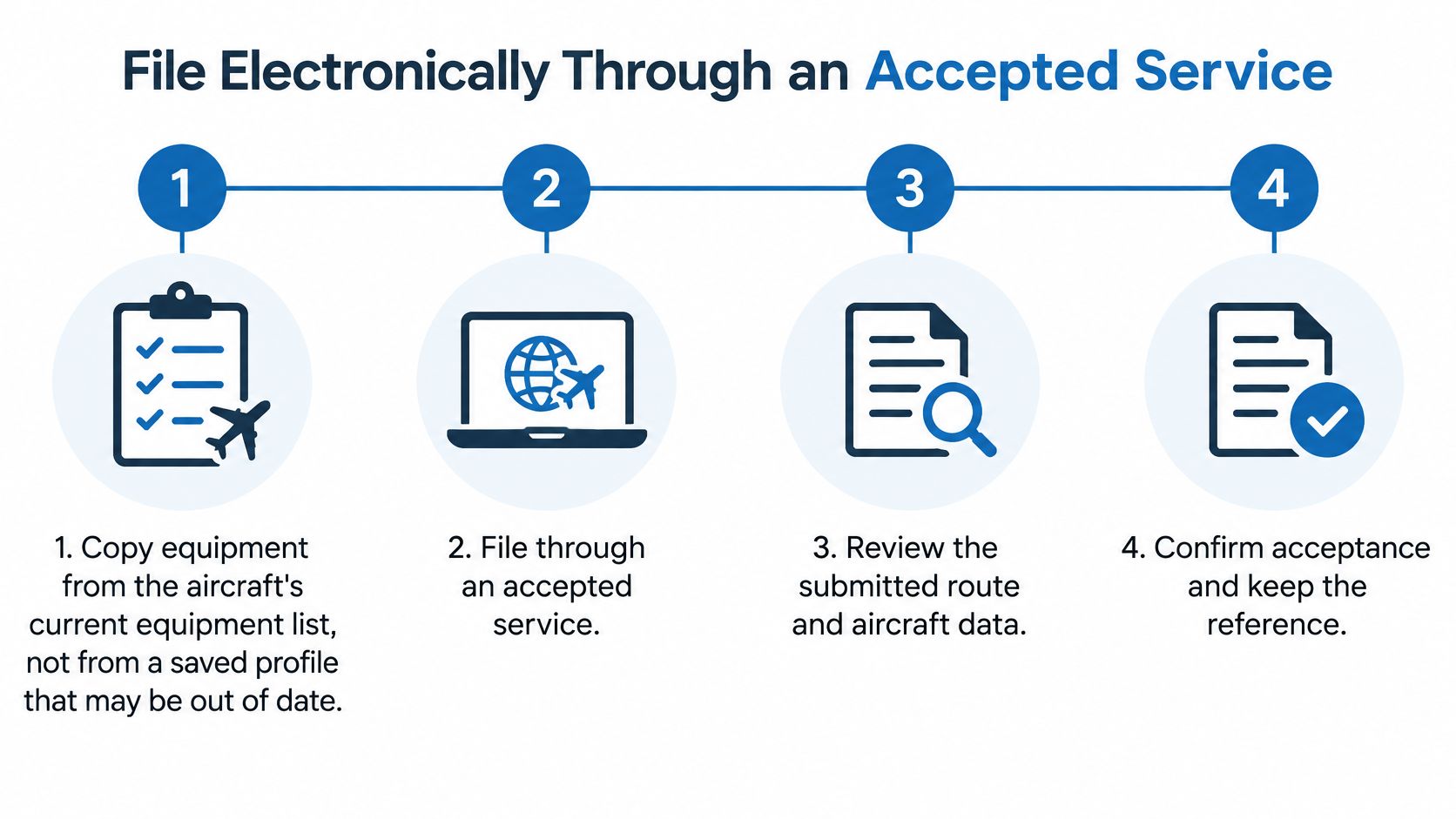
- Copy equipment from current aircraft records. Verify the installation and serviceability instead of trusting a saved profile.
- Submit through an accepted service or flight service specialist. Confirm that the service supports the operation and airspace involved.
- Review the submitted route and aircraft data. Allow the processing time specified by the applicable service and procedures, and check for changes before departure.
- Confirm acceptance and retain the reference. If a receiving unit can't process the intended digital message, confirm the conventional filing fallback instead of assuming delivery.
The filing timeline provides a useful final desk check.
Verify what the receiver accepted
Read the acknowledgement, not just the app's submission banner. If there's a rejection, identify the field involved and correct the underlying problem before resubmitting. Keep the accepted version available so an amendment doesn't leave you comparing the clearance with an obsolete draft.
Check current NOTAMs and the applicable AIP before filing. After an equipment change, review both the equipment declaration and any associated capability details. Confirm that the identification in the accepted plan matches the identification you'll use on the radio.
Our aviation-app comparison can help distinguish cockpit and planning tools. Electronic submission through an app is not automatically an FF-ICE electronic flight plan. A modern interface can still transmit a conventional text-format message.
According to the ICAO FF-ICE leaflet, the transition is phased, with global cessation of the ICAO 2012 flight plan targeted for 2034, rather than an assurance that every receiving unit already accepts the replacement.
That makes receiver capability a practical preflight question. Ask which message the service will send, how it handles unsupported recipients, and where you'll see confirmation of acceptance.
FF-ICE Transition and Which Message to Send
FF-ICE is a change in flight-information exchange, not a redesigned paper form. Release 1 supports the submission, updating, cancellation, and exchange of flight-plan information in a digital environment. For the pilot, the important question is whether the service and receiving ATS units support the required workflow.
FIXM is the structured data model used for exchanging flight information. It isn't a new abbreviation string that a student pilot should type into remarks. The filing system handles the technical representation; the pilot or operator remains responsible for accurate operational information.
Choose by receiver capability
| Situation | Message to send | Check first |
|---|---|---|
| Departure and every ATS unit on the route accept eFPL | Electronic flight plan under the applicable implementation | Confirm acceptance with the ATS unit or filing service |
| An ATS unit on the route cannot process eFPL data | Conventional ICAO 2012-format FPL through the established fallback | Confirm the fallback with the relevant unit or service before departure |
| Regional deployment hasn't reached the state | Conventional ICAO 2012-format FPL | Consult the state or regional AIP for local rules |
Use this as a planning decision aid, not a substitute for regional implementation instructions. A filing service may manage translation or fallback on the operator's behalf. Confirm that arrangement instead of submitting parallel messages and risking duplicate plans.
The departure state matters, but it isn't the only consideration. A route may cross boundaries between units with different capabilities, and acceptance at departure doesn't prove that every downstream recipient can process the same data.
Keep filing method separate from message format
You can file electronically today without sending an FF-ICE eFPL. Tapping “File” describes your interaction with the app, not necessarily the message exchanged between aviation systems.
Likewise, a digital acceptance notification doesn't, by itself, tell you which underlying format was used. If that distinction affects the route or regional requirement, obtain a clear answer from the filing service.
For a pilot asking, “Do I still file the conventional ICAO plan?”, the practical answer is yes where the applicable procedures still require it. Don't abandon the numbered-field workflow because you've heard about a future global transition.
Keep aircraft profiles current, follow implementation notices for the airspace you use, and verify the accepted message. Those habits remain useful even when the technical exchange changes.
Practice the Knowledge Test Topics
Once you can explain the form, practice the knowledge behind its entries. Flight rules depend on airspace and regulations. Equipment choices depend on navigation knowledge, while route decisions connect weather, charts, performance, and clearance procedures.
Turn each entry into a question
- Rules: Why does this operation begin VFR or IFR, and is a later change planned?
- Navigation: Can the aircraft legally and practically fly the requested route?
- Communication: Will the identification you transmit match the filed flight?
- Planning: Do the destination, alternate, elapsed time, and endurance describe the same flight?
Our iPhone study app supports Private Pilot and Instrument Rating written-exam preparation. Its question bank covers the FAA Private Pilot Knowledge Test topics, with questions written by active DPEs and CFIs and updated monthly.
Use the FAA knowledge-test preparation guide to organize study around weak subjects rather than memorizing a single filing example. This is test practice, not a filing service, certified flight instruction, or an official FAA publication.
Then return to the sample message and run the five-point check: identification, field separators, time formatting, internal Item 18 punctuation, and the empty-field value. Explain why every token is present before treating the exercise as complete.
Build the airspace, navigation, regulations, and radio knowledge behind an accurate flight plan with flyCowboys. Use its Private Pilot and Instrument Rating written-test practice to work on weak topics, then review a flight-plan exercise with your instructor using your aircraft's actual equipment records.